
Uncovering Navigation & Trust Barriers in a Legal Tech App
🔒 NDA Project — Wireframes recreated for portfolio use.
For additional project details - Get In Touch!
About the project
A moderated usability study identifying critical navigation and trust barriers in a legal tech mobile application.
Date:
Jan - Mar 2026
Team:
Micah Roberton
Danica Martins Layomi Akinrinade Manasvi Kale
My Role:
UX Researcher
PROBLEM & RESEARCH FOCUS
Helping users navigate the complex sign-up process of class action lawsuits
The Product
A mobile iOS application designed to aggregate class action lawsuit claims from various filing websites into one centralized hub. Users can discover settlements they may qualify for, learn about claim requirements, and initiate the filing process directly from the app.
The Challenge
The product team needed to understand whether new users could successfully locate and complete the sign-up process for a class action lawsuit. Our goal was to identify breakdowns in wayfinding, call-to-action clarity, and user comprehension of the claims filing journey.
PROBLEM & RESEARCH FOCUS
Helping users navigate the complex sign-up process of class action lawsuits
The Product
A mobile iOS application designed to aggregate class action lawsuit claims from various filing websites into one centralized hub. Users can discover settlements they may qualify for, learn about claim requirements, and initiate the filing process directly from the app.
The Challenge
The product team needed to understand whether new users could successfully locate and complete the sign-up process for a class action lawsuit. Our goal was to identify breakdowns in wayfinding, call-to-action clarity, and user comprehension of the claims filing journey.
MY CONTRIBUTION
I planned, moderated, synthesized, and translated findings into product recommendations.
My role focused on turning user behavior into clear evidence for the product team: defining the study goals, supporting moderated sessions, organizing observations through affinity mapping, triangulating qualitative and quantitative signals, and prioritizing recommendations for navigation, labeling, onboarding, and trust cues.
RESEARCH QUESTIONS
Can users successfully locate where to sign up for a claim from the home page, and what barriers, if any, do they encounter?
How confident do users feel while completing the process?
RESEARCH QUESTIONS
Can users successfully locate where to sign up for a claim from the home page, and what barriers, if any, do they encounter?
How confident do users feel while completing the process?
METHODOLOGY
A mixed-methods approach combining observation with qualitative feedback
Participants
We recruited 5 participants representing new users who might realistically download the app to search for potential settlements.
Tasks
Participants completed three core tasks representing the end-to-end user journey:
Onboarding: Complete account creation and preference selection
Find & File a Claim: Locate a class action and initiate the sign-up process
Locate Submitted Claim: Find the record of their filed claim within the app.
SYNTHESIS APPROACH
After conducting the 5 sessions, the team synthesized findings using affinity mapping.
We transferred key observations onto sticky notes and organized them on a whiteboard, grouping issues by task flow.
We then applied a triangulation approach, cross-referencing quantitative metrics (task time, tap counts, error rates) with qualitative data (think-aloud quotes, observed hesitations, post-task feedback) to identify recurring patterns.
Finally, we assigned priority ratings (High, Medium, Low) based on how many users were affected and whether the issue blocked successful task completion.
FINDINGS
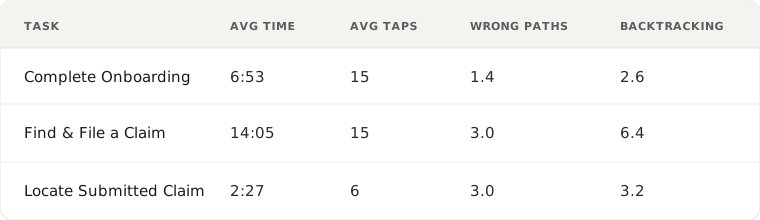
Task completion with significant friction
All participants eventually completed each task, but the journey revealed substantial friction. The high number of incorrect paths and backtracking moments indicated users lacked confidence in where they were going.
KEY THEMES
Three core challenges emerged from testing
01.
Discoverability
Users struggled to understand where claims were located and how to navigate between overlapping pages with unclear purposes.
02.
Context & Clarity
Labels like "Learn More" and "Me" didn't communicate expected actions, and onboarding failed to explain the connection between preferences and eligibility.
03.
Trust
Users had mixed reactions to external website redirects, some found it legitimizing while others questioned the app's value proposition entirely.
EVIDENCE-LED FINDINGS & RECOMMENDATIONS
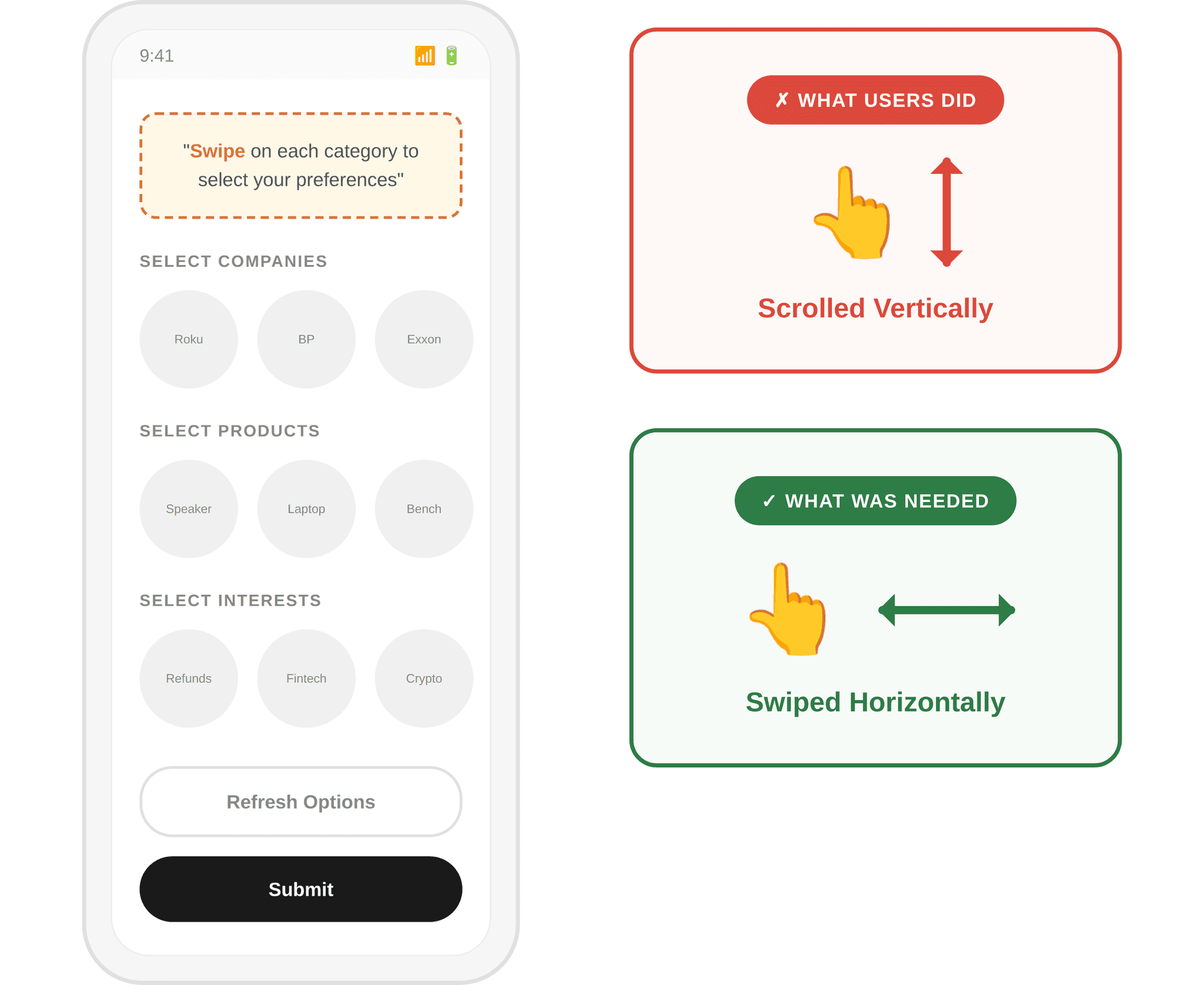
Unclear “Swipe” Interaction
RECOMMENDATION
Add visual indicators such as scroll arrows or fade effects to signal additional content within each category.
High Priority
Clarity
5 of 5 users misread the horizontal swipe as a vertical scroll during onboarding, stalling progress in the first task.
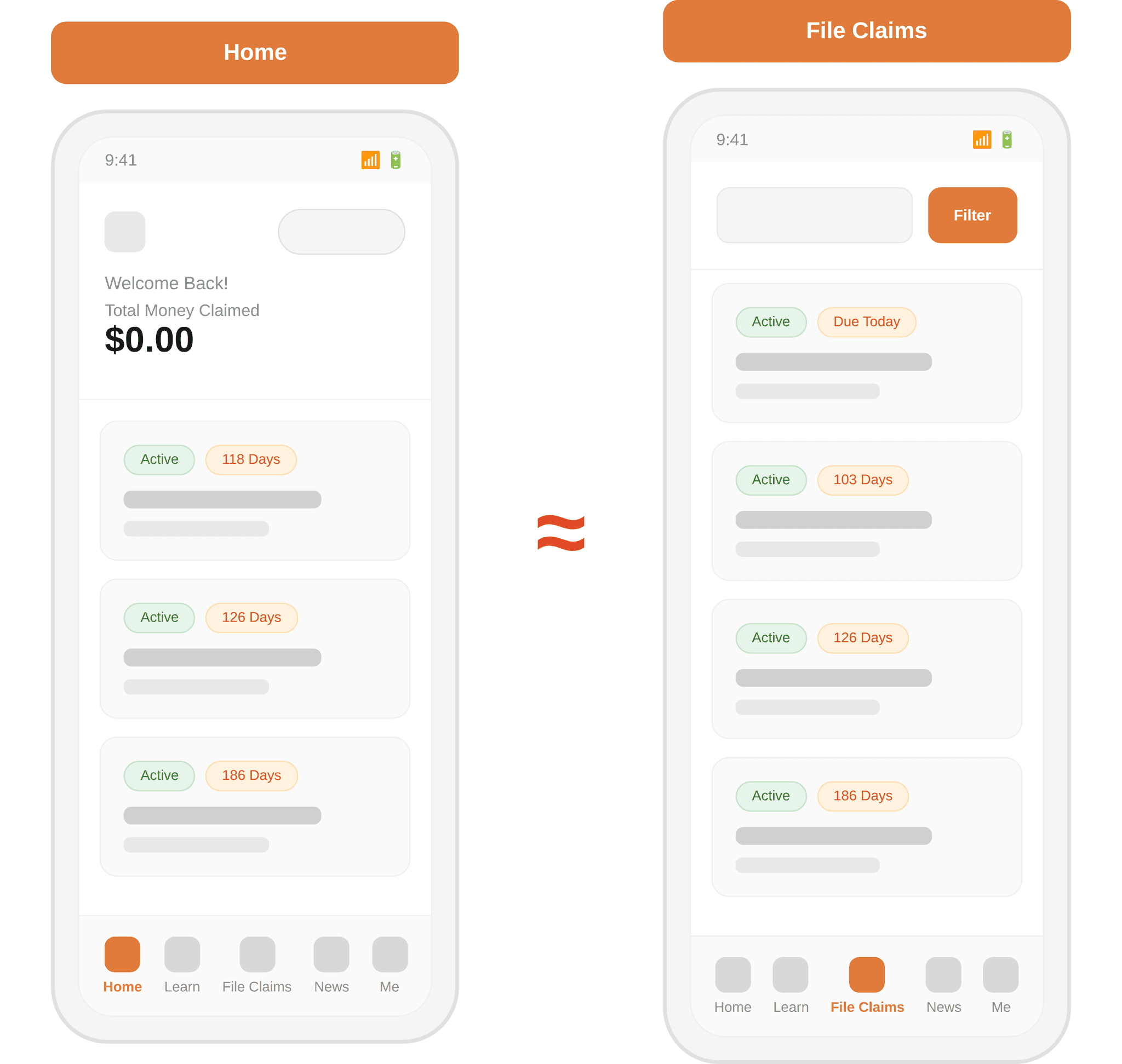
Users couldn’t tell pages apart
RECOMMENDATION
Clearly label “All Class Actions” for the database view vs. “Class Actions For You” for personalized matches based on onboarding preferences.
High Priority
Clarity & Discoverability
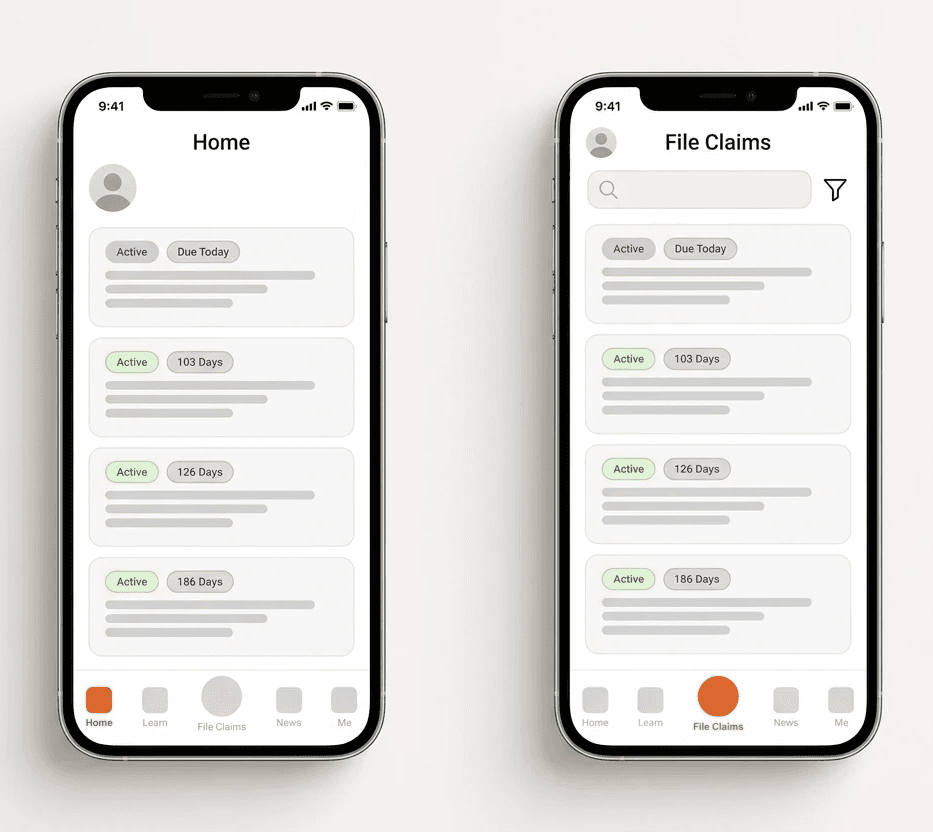
Home and File Claims looked identical, users averaged 8 wrong paths and 6.4 backtracks trying to locate the right page.
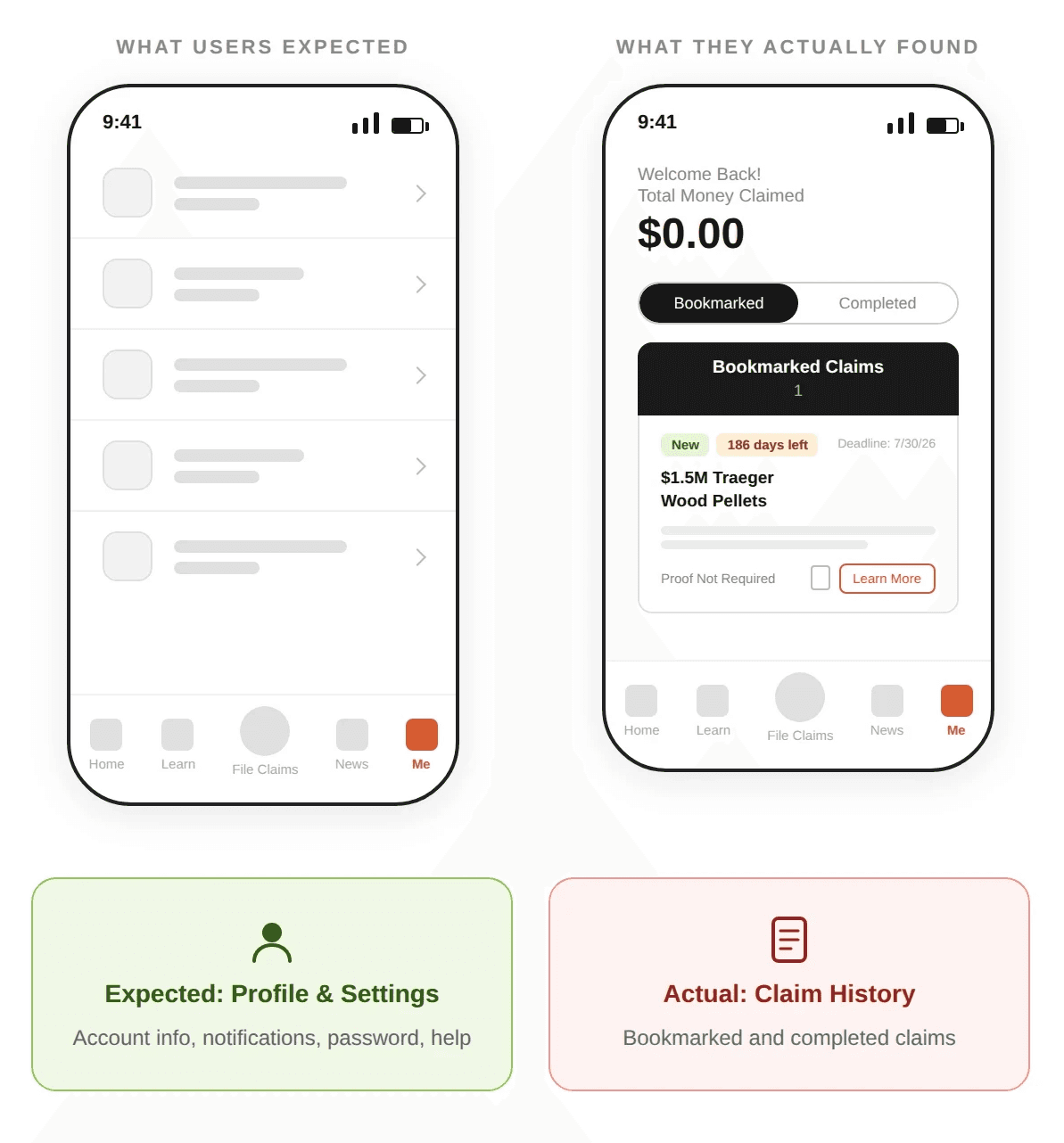
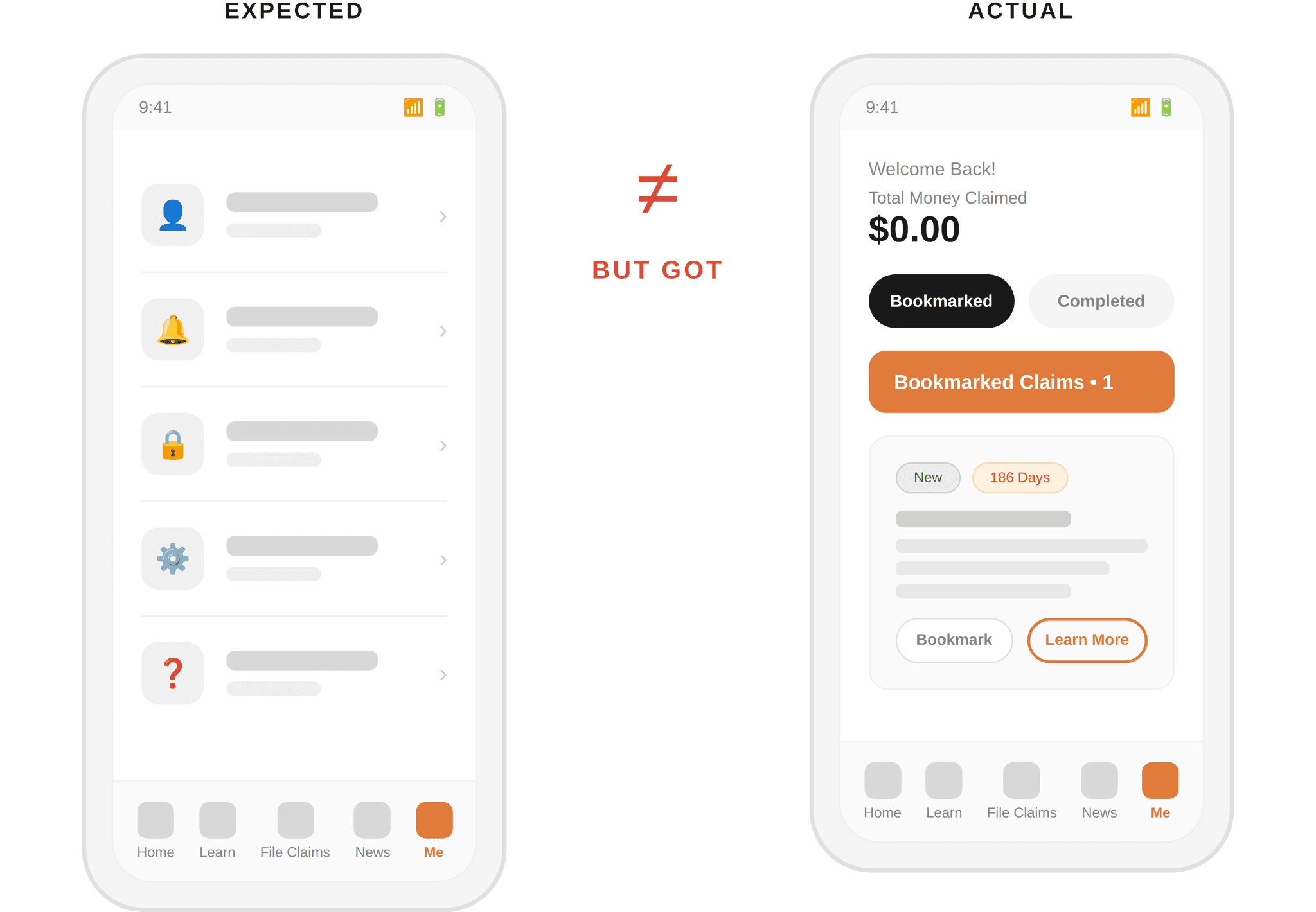
“Me” Tab Mental Model Mismatch
RECOMMENDATION
Relabel the tab to “My Claims” or “Profile & Claims” to accurately reflect the information architecture.
High Priority
Discoverability
4 of 5 users failed to locate their submitted claim within the first 2 tries, all looked at Home or File Claims tabs first.
Mixed Reactions to External Redirects
RECOMMENDATION
Add a clear external link signifier (icon) to communicate that the action will navigate outside the app.
High Priority
Trust & Clarity
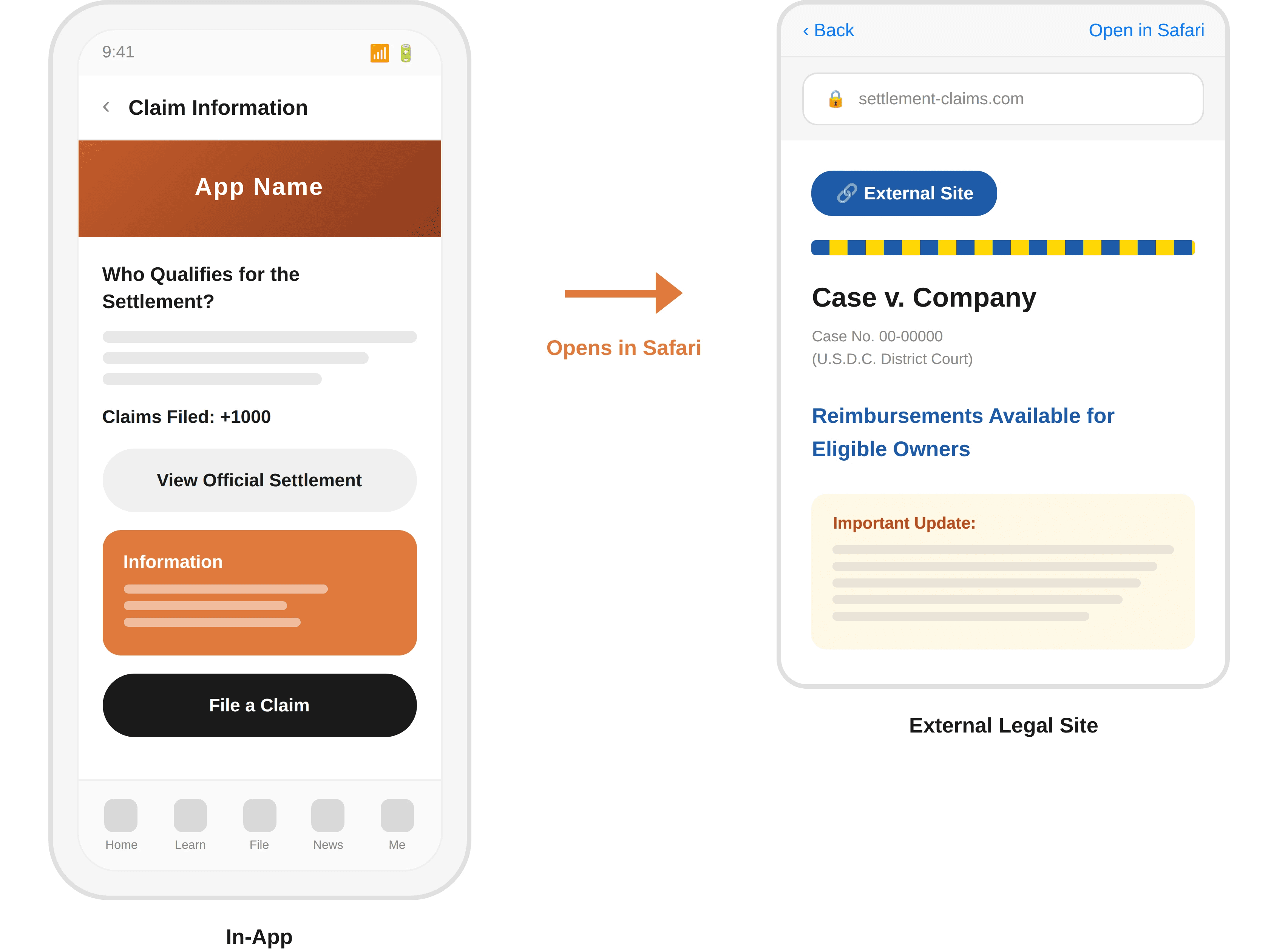
All 5 users were redirected to an external site to complete filing — 3 questioned the app’s value, 2 felt the official site was more trustworthy.
IMPACT & HANDOFF
How the research moved the product forward:
Guided Cross-Functional Teams: Acted as the foundational reference document for developers and product managers to align on updates and technical implementation.
Validated Product Assumptions: Backed the product team’s hypotheses with empirical user data to pinpoint the exact root causes of sign-up funnel breakdowns.
Drove Feature Improvements: Translated user friction into actionable design recommendations that the team directly used to resolve blockers and optimize the app.
OUTCOME & NEXT STEPS
Key Takeaways
The study revealed that while participants could eventually complete tasks, they did so with significant hesitation, backtracking, and uncertainty. Task completion alone did not reflect a confident or intuitive experience.
The application’s main challenge is not simply helping users complete a claim, but helping them understand the system well enough to do so confidently. Future iterations should prioritize:
Clearer navigation hierarchy with distinct purposes for each page
More explicit labeling that communicates actions and destinations
Stronger onboarding context connecting user input to eligibility matching
Trust-building cues that clarify the value of aggregation vs. direct filing
REFLECTION & LEARNING
What Worked Well
The moderated testing format with think-aloud protocol provided rich qualitative insights into user reasoning
Screen mirroring to large displays allowed the full team to observe without crowding participants
Combining quantitative metrics with qualitative observations enabled triangulation of findings
Standardized study kit ensured consistency across all five sessions
What I’d Improve
Recruit a broader participant pool beyond university students to better represent target demographics
Incorporate eye-tracking to capture focus patterns from participants who struggle with think-aloud
Separate onboarding evaluation from claim discovery to allow deeper analysis of each flow
Curious to know more about this project?
Next CASE STUDY →
AuraFocus: An adaptive AR task assistant
PROBLEM & RESEARCH FOCUS
Helping users navigate the complex world of class action lawsuits
The Product
A mobile iOS application designed to aggregate class action lawsuit claims from various filing websites into one centralized hub. Users can discover settlements they may qualify for, learn about claim requirements, and initiate the filing process directly from the app.
The Challenge
The product team needed to understand whether new users could successfully locate and complete the sign-up process for a class action lawsuit. Our goal was to identify breakdowns in wayfinding, call-to-action clarity, and user comprehension of the claims filing journey.
RESEARCH QUESTIONS
How easily can users locate where to sign up for a claim from the home page?
What navigation paths do users take when attempting to find and file a claim?
Which interface elements support or hinder discoverability?
How confident do users feel while completing the process?
Where do users hesitate, backtrack, or abandon tasks?
METHODOLOGY
A mixed-methods approach combining observation with qualitative feedback
Participants
We recruited 5 participants representing new users who might realistically download the app to search for potential settlements.
Tasks
Participants completed three core tasks representing the end-to-end user journey:
Onboarding: Complete account creation and preference selection
Find & File a Claim: Locate a class action and initiate the sign-up process
Locate Submitted Claim: Find the record of their filed claim within the app.
SYNTHESIS APPROACH
After each session, the team synthesized findings using affinity mapping. We transferred key observations onto sticky notes and organized them on a whiteboard, grouping issues by task flow and categorizing them as “Challenges,” “Wins,” or “Surprises.”
We then applied a triangulation approach, cross-referencing quantitative metrics with qualitative data to identify recurring patterns. Finally, we assigned priority ratings (High, Medium, Low) based on whether the issue blocked successful task completion.
FINDINGS
Task completion with significant friction
All participants eventually completed each task, but the journey revealed substantial friction. The high number of incorrect paths and backtracking moments indicated users lacked confidence in where they were going.
KEY THEMES
Three core challenges emerged from testing
01.
Discoverability
Users struggled to understand where claims were located and how to navigate between overlapping pages with unclear purposes.
02.
Context & Clarity
Labels like "Learn More" and "Me" didn't communicate expected actions, and onboarding failed to explain the connection between preferences and eligibility.
03.
Trust
Users had mixed reactions to external website redirects, some found it legitimizing while others questioned the app's value proposition entirely.
EVIDENCE-LED FINDINGS & RECOMMENDATIONS
Unclear "Swipe" Interaction
RECOMMENDATION
Add visual indicators such as scroll arrows or fade effects to signal additional content within each category.
High Priority
Clarity
Users couldn't tell pages apart
RECOMMENDATION
Clearly label "All Class Actions" for the database view vs. "Class Actions For You" for personalized matches based on onboarding preferences.
High Priority
Clarity & Discoverability
RECOMMENDATION
Relabel the tab to "My Claims" or "Profile & Claims" to accurately reflect the information architecture.
"Me" Tab Mental Model Mismatch
High Priority
Discoverability
Mixed Reactions to External Redirects
Trust & Clarity
High Priority
RECOMMENDATION
Add a clear external link signifier (icon) to communicate that the action will navigate outside the app.
REFLECTION & LEARNING
What Worked Well
The moderated testing format with think-aloud protocol provided rich qualitative insights into user reasoning
Screen mirroring to large displays allowed the full team to observe without crowding participants
Combining quantitative metrics with qualitative observations enabled triangulation of findings
Standardized study kit ensured consistency across all five sessions
What I’d Improve
Recruit a broader participant pool beyond university students to better represent target demographics
Incorporate eye-tracking to capture focus patterns from participants who struggle with think-aloud
Separate onboarding evaluation from claim discovery to allow deeper analysis of each flow